
Table of Contents
- Quick Comparison: Best Renter-Friendly Smart Home Gadgets
- No-Drill Smart Home Upgrades That Won't Cost Your Deposit
- Smart Home Devices Under $50 That Actually Work
- Renter-Friendly Smart Security Cameras and Sensors
- How to Set Up a Smart Home Ecosystem in a Small Apartment
- Wi-Fi Management in Shared Buildings: Avoiding Dead Zones
- Moving Your Smart Home: What to Pack and What to Leave
- Frequently Asked Questions
Last Updated: September 23, 2026
Quick Comparison: Best Renter-Friendly Smart Home Gadgets
Renting shouldn't lock you out of a connected home. The best affordable smart home gadgets for renters in 2026 install without drills, screws, or landlord permission, and they move with you when the lease ends. This guide from Trending Now Co. covers what works, what it costs, and how to set it up in an afternoon.
Here's the short version before the details:
| Gadget | Price | Install Method | Best For |
|---|---|---|---|
| Wireless Motion Sensor Light | $14.07 | Adhesive mount, no wiring | Hallways, closets, entryways |
| Smart IR Remote Adapter | $10.71 | Plug into phone, no mounting | TV, AC, set-top box control |
| 1080° Rotatable Faucet Extender | $16.92 | Twist-on, tool-free | Kitchen and bathroom sinks |
| Pixel Style RGB Lantern Light | $17.58 | Tabletop, zero install | Ambient bedroom lighting |
| Portable 3-in-1 Air Cooler Fan | $4.14 | USB-powered, portable | Desks, bedrooms, cars |
| Air Purifier | $66.27 | Wall-mountable or freestanding | Pet areas, small rooms |
| Portable Projector | $72.00 | Tabletop, no mounting | Movie nights on any wall |
| HY300 Pro Projector | $126.72 | Tabletop, no mounting | Home theater setups |
No-Drill Smart Home Upgrades That Won't Cost Your Deposit
The biggest mistake renters make is assuming "smart" requires permanent installation. Adhesive-mount and plug-in devices cover most of what people want from a connected home and leave zero trace on the walls.

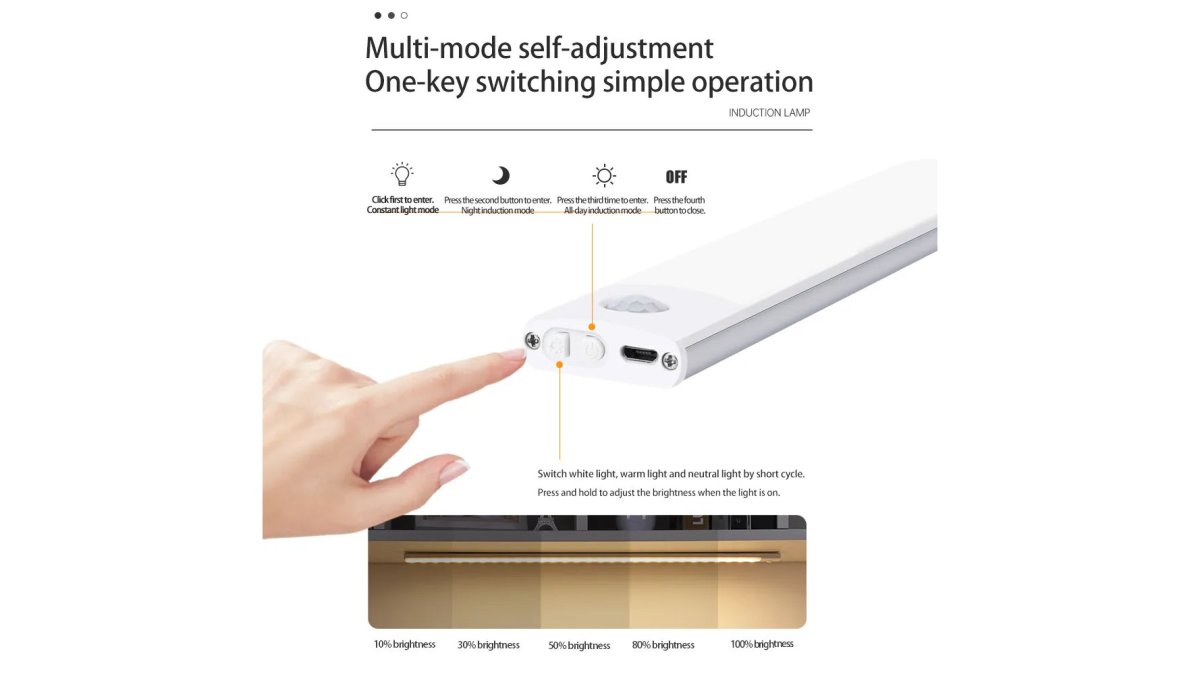
A few lease-friendly installation techniques worth knowing:
- Test adhesive strips on an inconspicuous patch of wall for 24 hours before committing
- Clean surfaces with rubbing alcohol first; dust and grease are why most adhesive mounts fail
- Keep the original packaging so you can remount devices at your next place
- Photograph your setup before moving out so you know exactly what to remove
Smart Home Devices Under $50 That Actually Work
Budget smart home gear has a reputation problem, and it's mostly deserved: cheap devices often ship with clunky apps or die within a year. But a handful of sub-$50 picks genuinely deliver.
Renter-Friendly Smart Security Cameras and Sensors
Here is how the categories actually differ for renters:
- Indoor cameras sit on a shelf or mount with adhesive. Look for local storage (a microSD card) so you're not forced into a monthly cloud plan. Pan-and-tilt models cover more of a small apartment from one outlet.
- Video doorbells are the trickiest rental install. A peephole camera replaces the existing peephole in minutes with no wiring, while a battery doorbell requires mounting a bracket to the doorframe or wall. Check your lease before attaching anything to a shared exterior door; prefer the peephole style if unsure.
- Retrofit smart locks wrap around the deadbolt you already have, keeping the landlord's hardware while swapping the interior thumb-turn for an app- and keypad-controlled unit. You get keyless entry and temporary guest codes without changing the cylinder.
A few concrete mechanisms worth knowing:
- Local vs. cloud storage. Local recording avoids a subscription and keeps footage on a card you control. Cloud recording survives a stolen camera but usually costs a recurring fee. Many devices do both.
- Motion zones. Most camera apps let you mask off a busy street or a neighbor's window so you only get alerts that matter. This cuts false notifications dramatically in an apartment.
- Two-factor authentication. Turn it on for every camera and lock account. A compromised account is a bigger risk than a compromised camera.
A practical note on subscriptions: add up the monthly fees before you buy. Three cameras on three separate cloud plans can quietly cost more per year than the hardware did.
How to Set Up a Smart Home Ecosystem in a Small Apartment
Here is the sequence that works:
Wireless Motion Sensor Light →
- Start with your Wi-Fi. Test signal strength in every corner before buying anything. Devices fail more often from weak signal than bad hardware, and in a small unit placement decides everything.
- Pick a compatibility standard before you buy. Matter is the cross-brand standard that lets devices from different makers work together, and Thread is a low-power networking layer some devices use to stay connected without draining batteries. Buying Matter-compatible gear now means your devices keep working when you change phones or apps.
- Add one control layer. The Smart IR Remote Adapter ($10.71) gives your phone authority over the TV and AC, the fastest win in a small space. It works with Type-C and Micro USB ports and pairs through an app.
- Layer in lighting. The Pixel Style RGB Lantern Light ($17.58) is tabletop, rechargeable, and remote-controlled, so it adds ambiance with zero installation and no outlet commitment.
- Add utility devices last. The Air Purifier, motion sensor light, and cooler fan fill specific gaps once the basics work.
- Group everything into routines. Morning, away, and night modes take ten minutes to configure and change how the apartment feels.
Concrete automations that pay off in small spaces:

- Motion-triggered lighting. Pair the motion sensor light with a smart plug so a lamp turns on when you walk in and off after a set time, a stand-in for a wall switch you can't rewire.
- Away mode. One tap turns off the IR-controlled AC, the purifier, and the lantern, which cuts standby draw and gives the place a lived-in look while you are out.
- Sunset trigger. Schedule the RGB lantern to warm up as the sun sets so you are not flipping switches in the dark when you get home.
Wi-Fi Management in Shared Buildings: Avoiding Dead Zones
Shared buildings are hostile to Wi-Fi: thick walls, neighboring networks crowding the same channels, and router placement you can't control. The fix isn't a bigger router, it's better placement and, in larger units, a mesh network.
What works in practice:
- Move your router off the floor and away from metal, mirrors, and microwaves
- Change your channel if your building is dense; the default is usually the most congested
- Add a mesh node in the room with the weakest signal rather than boosting power
- Prioritize the 5GHz band for devices near the router and 2.4GHz for anything far away
- Limit connected devices during setup so you can isolate what's causing latency
Moving Your Smart Home: What to Pack and What to Leave
Moving is where cheap smart home gear proves its value. Devices you installed with adhesive, plugged into USB, or set on a tabletop pack in a single box; anything you screwed into a wall becomes someone else's problem.
Pack these without hesitation:
- The Smart IR Remote Adapter and Portable 3-in-1 Air Cooler Fan: both fit in a pocket
- The Pixel Style RGB Lantern Light: rechargeable and portable by design
- The Wireless Motion Sensor Light: peel it off, replace the adhesive strip, remount
- The Air Purifier: wall-mountable, so it lifts off and travels flat
Frequently Asked Questions
What are the must-have smart home gadgets for renters in 2026?
For renters in 2026, the must-have smart home gadgets focus on no-drill installation and portability. Top picks include wireless motion sensor lights for hands-free illumination. Devices under $50, like the Type-C Smart IR Remote Adapter at $10.71, let you control TVs and AC units from your phone without permanent wiring. Prioritize gadgets that are easy to remove and move to your next apartment.

How can I make my apartment smart without damaging the walls?
You can make your apartment smart without damaging walls by choosing no-drill smart home upgrades. Use adhesive-backed mounts for motion sensor lights, or select devices that sit on tables and shelves. The Wireless Motion Sensor Light at $14.07 mounts with adhesive and requires no wiring or tools. Voice assistants need only an outlet and Wi-Fi, leaving walls untouched.
Are smart home gadgets easy to remove when moving out?
Yes, most renter-friendly smart home gadgets are designed for easy removal. Adhesive-mounted devices like the Wireless Motion Sensor Light peel off without leaving holes. Before moving, factory reset devices that store personal data to protect your privacy. Pack smaller items in labeled boxes and keep original packaging for fragile electronics. Devices that use adhesive strips may need new strips for the next apartment.
What are the best budget-friendly smart home devices under $50?
The best budget-friendly smart home devices under $50 combine low cost with renter-friendly features. The Type-C Smart IR Remote Adapter at $10.71 turns your phone into a universal remote for TVs and AC units. The Wireless Motion Sensor Light at $14.07 adds hands-free lighting to closets and hallways. The 1080° Rotatable Faucet Extender at $16.92 improves sink efficiency without tools. The Pixel Style RGB Lantern Light at $17.58 adds ambient lighting. All are easy to install and remove.
Will smart home gadgets work in an apartment with shared Wi-Fi?
Smart home gadgets can work with shared Wi-Fi, but you may need to manage bandwidth and connectivity. Use a mesh network or Wi-Fi extender to strengthen your signal if the router is far away. Devices like motion sensor lights use little bandwidth, so they rarely cause issues. If your building's Wi-Fi is unreliable, a mobile hotspot can serve as a backup for critical devices.